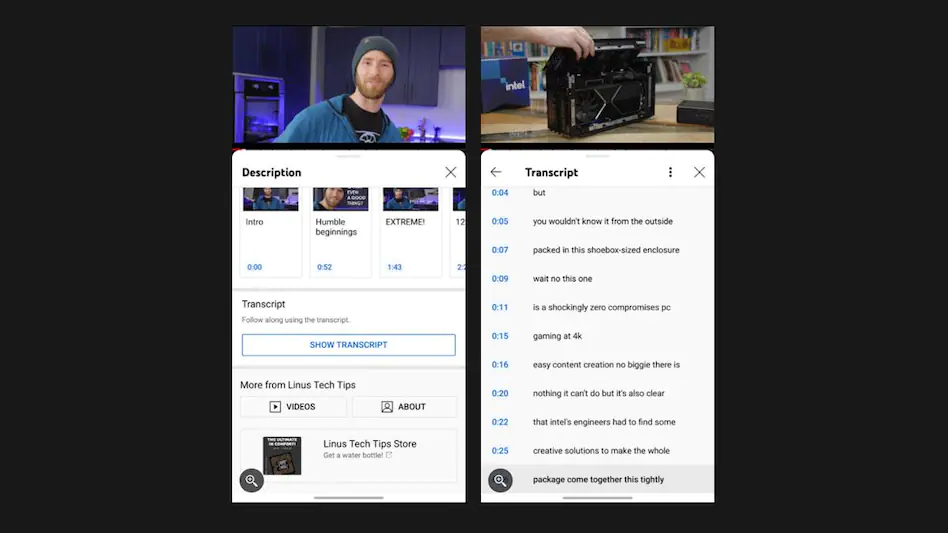
YouTube has added a very useful feature to its videos that will greatly simplify working with quotes and scripts. The platform hosts videos ranging in length from a few seconds to several hours, including podcasts, video essays, and more. And if you needed to find a specific quote or section from these lengthy videos, you’d have to sit through the majority of them until you found what you needed.
This problem is now solved by the new transcription feature, which allows users to search for specific parts of a video. And, starting with Android devices, this feature will be available on mobile devices as well.
Transcription was previously only available on YouTube’s desktop site. The feature is now available on mobile, and if and when it is, you can click on the “Show Transcript” button that will appear below a video’s expanded description, between chapters, and suggested uploads from the channel you are currently watching.
The transcript option looks the same on the desktop as well, but the one on the mobile has been changed a bit to fit the UI. This one allows you to scroll through a full script on your phone so you can read along or jump quickly to a specific section or timecode.
The mobile version, on the other hand, does not allow you to search through lines directly, making it less useful than the desktop version.
Nonetheless, it is more convenient because previously, the only way to load a transcription on the mobile site was to use Chrome.
YouTube’s transcription for Android is being rolled out via a server-side update, so don’t expect it to be available to all Android users right away. You should see the “Show Transcript” option appear under videos you’re watching once it’s available.